Wednesday, March 23, 2016

Teaching Tip: A Guide to Critical Reading

By Guest Blogger, Tammy Root

Are you looking for ways to help your students get more out of assigned readings? Here are five easy reading strategies that can be used in a variety of disciplines. 

1. Turn and Teach: This strategy can be used in two different ways. A). Give students a topic and have them turn and talk about it; this is a great way to activate prior knowledge. B). Have students read an article, or chapter, and have them turn to each other and teach one another what they just learned. How simple is this strategy? 

2. Reading with a Question in Mind: Have students turn the title, and each subtitle, of a chapter into a question (using who, what, when, why, or how). The students will then read the text and answer their questions. This strategy allows students to become “detectives” while reading and stay focused! 

3. Sketching Through the Text: Not every student learns through reading and writing, some students are more visual. This strategy allows those visual students a chance to put words into their own language through pictures! Have students read a section of a chapter or article then have them draw what they just read. This strategy can be used in place of summaries. This is also a great way to review material when studying for a test. 

4. Quote Mingle: Take a copied version of a chapter or article and cut out different quotes. Have the students read the quotes and come up with a title for the chapter or article. After students read the text, see how close their title was to the actual title. This gives students a focus while reading. 

5. Text Coding: Text coding is a short-hand version of text annotating. Below is a link with examples of codes for students to use while taking notes as they read. I also encourage students to make up their own codes. 

http://www.heinemann.com/shared/companionResources/E03087/47_TextCodes.pdf 

If you would like to know more reading strategies I use in my classes, please email me at roott3@lcc.edu; I will send you an example! 

Daniels, Harvey, and Nancy Steineke. Texts and Lessons for Content-area Reading. Portsmouth, NH: Heinemann, 2011. Print.

Monday, March 21, 2016

The World Classroom: Experience of Learning at LCC, Part 1


Last night I caught a vision of what experiential, hands-on education can look like. For three hours, in the Centre for Engage Inclusion, I met with Patty Ayers, Kamar Hamilton, Paul Hernandez, Anne Heutsche, and Kali Mujamdar, and we learned how effective student learning happens through a Service Learning paradigm and application. 

Service Learning is not new, but it remains a unique pedagogy that uses student community involvement and activity to achieve specific learning objectives in a given academic course. While it may appear similar to community service, Service Learning is not simply about helping people and communities in need, important as that may be. Rather, it’s about learning how to integrate and translate traditionally classroom-bound academic study into the broader social, political, and economic environment. 

Ayers, Heutsche, and Mujamdar have been teaching and talking about Service Learning for a while now. With the arrival of Paul Hernandez, LCC’s Chief Diversity Officer, new blood is reinvigorating old efforts. Hernandez has a history of working with at-risk K-12 populations, inspiring them to imagine themselves succeeding in college and university contexts, and teaching them practical skills that can turn higher-education aspirations into reality. 

As I write, Service Learning is gaining precious momentum at LCC and in the broader Lansing area. We are cultivating connections with Eastern, Grand Ledge, and Eaton Rapids High Schools, for example, by training our sociology and history students to work with at-risk students at those schools. Our students develop the skills they need in Service Learning workshops to communicate effectively with Eastern students about the possibilities of their academic careers beyond high school. The high school students, in turn, provide important information that the LCC students can use to further their research activities—ethnographies and local histories, e.g. 

When I expressed some reservations that perhaps my writing and literature courses were not quite right for Service Learning, interested though I was, Hernandez reassured me that “Service Learning is for everybody.” There is not an academic discipline imaginable that can’t be turned in the direction of Service Learning. Neither does such pedagogy need only deal with other educational institutions. When it comes to Service Learning, the world is our oyster, and the only limits lie in the imagination itself. 

In future blogs, we will continue to explore advantages of ‘experiential’, active education, and how it can be used to advance higher education here at LCC and beyond. 

If you would like to discuss Service Learning, contact Tim Deines at deinest@star.lcc.edu or stop by the CTE, TLC Room 324.

Wednesday, March 16, 2016

Teaching Tip - Mid-Semester Feedback


As part of the review of instruction here at Lansing Community College, all sections are given IDEA surveys during the last quarter of the semester. The objective of these student evaluations is to give us information to inform our teaching, but by the time we hear this feedback, the students who gave it are long gone. 

The IDEA surveys are required, but we also have the opportunity to ask our current students what they need while there is still time to implement changes. The mid-point of the semester is a good time to regroup and ask students what’s going well and what needs improvement. 

The Sheridan Center for Teaching and Learning at Brown University has some suggested questions for soliciting input mid-semester: 
  • What aspects of the course have been especially helpful in terms of your learning?
  • What aspects of the course could be improved?
    • What changes could the instructor make to improve the learning environment?
    • What changes could you make to improve your own learning/studying in this course? 
These questions could be answered during a five minute break in lecture or in a D2L survey. After you look over the results, hold a short debrief addressing any student concerns. Concentrate on one or two changes you can make, and try to keep a positive atmosphere. If students have made suggestions that you cannot (or choose not to) implement, I suggest addressing this with the group. Give clear explanations without being defensive … remember that you did ask them for feedback. Students will appreciate being heard, and you may have the chance to close the circle. 

If you need help setting up a D2L survey or would like to discuss mid-semester feedback, contact Meg Elias at clarkm1@star.lcc.edu or stop by the CTE, TLC Room 324.

Tuesday, March 1, 2016

T5 - Customizing Widget Backgrounds in D2L

D2L has added a new feature to the Customize Widget Style dialog window.

About half-way down the dialog listing, there is a Widget Background section.  Its only control is a check box with the word Transparent next to it.

Checking this box makes the Widget Background transparent and greatly improves the appearance of widget-based banners and other items.  Previously, banner widgets were surrounded by a white border, which detracted from their appearance.  Setting the widget background to transparent eliminates the border and greatly improves the appearance of banners.

If you'd like to talk more about customizing your D2L site, visit the CTE or contact John Thommen at thommej@star.lcc.edu.

Thursday, February 18, 2016

Inside the Teaching Professor - Teaching Beyond the Discipline

Recently while driving around town I heard on the radio an interview with the classicist Mary Beard. In the interview she talked about her now 10-year-old blog, A Don’s Life. It sounded interesting, so I checked it out. 

Turns out that Beard writes on all kinds of subjects in A Don’s Life, not only or even primarily on ancient Western topics. She tackles the Cecil Rhodes controversy at Oxford, for instance, how we handle disagreement today, her vacation to Iceland, and more, ten years more. Some of it I liked!

The more I browsed, the more it came home to me how important it is that academics remain interested in the world beyond our limited disciplines. It may even be that our intellectual peregrinations are crucial to our continued disciplinary relevance. 

This is part of Pamela Reese’s underlying point in “The Classic Movies Come to Class” in the January edition of The Teaching Professor. Reese wants all of us, in every discipline, to work ‘classic’ movies into our curriculum. By experiencing such films, according to Reese, students “can have thrilling revelations that bridge directly to what they are studying.” By a slight change of focus and medium, the desired learning objective can be attained. Reese provides a nice list of films to consider, too! 

By reminding us that our disciplines exist in broader contexts and relations, Beard and Reese encourage us to bring all of our intellectual interests and creativity to bear on our teaching.

The Teaching Professor includes summarized articles from various educational publications, as well as original articles from university and college instructors. If you are interested in viewing articles in this and/or other publications, contact Tim Deines at deinest@star.lcc.edu or stop by the CTE, TLC 324.

Wednesday, February 17, 2016

Gamify Your Content with BINGO!

In planning my calendar each semester, I schedule time for in-class exam review.  I find that even a short review session can relieve some of the anxiety students face come test time.  In addition, it's a chance for me to sneak in a low-risk assessment before the "real thing."  Instead of repeating my lecture material, I try to create activities that push the students to be active in their learning.

In cases where students need to master new terminology for an exam, I create custom Bingo cards at Print-Bingo.com.  With 24 terms (plus the FREE center square), Print-Bingo will generate 10 unique cards in a downloadable .pdf file.  For a large class, I either generate multiple sets or just print several copies of one set ... I'm okay with multiple winners.  Students choose a card and they have 5 minutes to look over the terms and ask questions.

When we're ready to play, I read one definition at a time in random order, and the students have to cross-out the corresponding term on their Bingo cards.  When a student gets BINGO, I give them the chance to drop one 2-point question on the exam.  We play until roughly half the class wins.  

For the students who struggle to match definitions to the terms, the game is a wake-up call.  For me, it helps identify students who might need some extra help or even a referral to the Learning Commons.  Yes, there's an element of chance involved in winning (which card you pick), but the risk and the reward are so small that students don't complain.

If you'd like to talk more about using games for test review, visit the CTE or contact Meg Elias at clarkm1@star.lcc.edu.

Thursday, February 11, 2016

Teaching Tip - Video Feedback for Students

For the last few semesters, I have required my Composition II students to complete a public writing project. Since their final work is published on the web, I couldn’t provide them with the type of feedback that I normally do using Microsoft Word: in-text comments throughout their essay and some narrative comments at the end. 

Since I still want to point out specific features within the text as well as provide some summary comments, I use Video Feedback—and I actually receive positive reviews from the students about the videos. The process is relatively quick and easy (once I got the hang of the technology), and it can be used by any instructor who wants to provide some personalized feedback on their students’ work. It doesn’t just have to be a writing assignment; it would work well for any type of digital submission required of students. 

Using Screen Capture, I use the mouse to indicate specific areas within the essay I want to discuss with my students. I simply move my cursor arrow around the general area, or highlight specific parts of the text while I tell the student what I want to say about his/her work. Then, I am able to move my cursor to the next section I wish to discuss. 


To create Video Feedback, you will need a computer equipped with a microphone and a simple Screen Capture program. I used Jing, a program available for FREE download. Now, Kaltura, an easy Screen Capture program, is already available within Desire2Learn (D2L). The advantage of Kaltura is that the video files are easily saved within the “My Media” area within D2L, which makes sharing those videos with students even simpler. As for a microphone, I recommend one of the external headset microphones; they make for much better sound quality. 

 Try these basic steps for giving Video Feedback: 
  1. Read and review student’s work first, taking notes on what you wish to say. Organize your thoughts a bit before you begin recording. 
  2. Call up the student’s work on your computer screen, then open Jing or Kaltura whichever you prefer. Set the screen capture area to record just the student’s work, not your entire computer screen. 
  3. Begin recording, making sure to talk slowly and clearly. Begin with some overall thoughts, especially something positive. Then spend time pointing out interesting ideas or possible areas for improvement. 
  4. If you need to discuss grammar/mechanics errors that overwhelm a student’s writing, do so in a general statement about the problem. Don’t try to point out each and every error; instead, choose one or two examples that are indicative of the patterns you are observing. 
  5. Keep the videos under five minutes. 
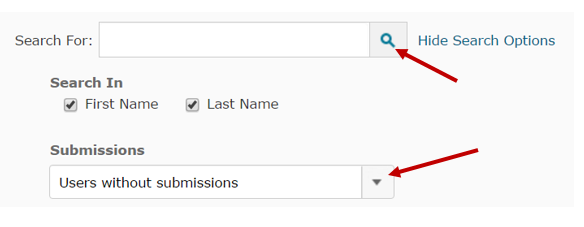
  6. Upload the videos to each student using a D2L dropbox. If the students did not submit the work to a dropbox, create one in D2L anyway. In the Folder Submissions view, select Users without submissions then click on the search icon; you will then be able to see all of the students, enter their grades, and upload the Video Feedback for each one. 

If you would like assistance getting started on providing Video Feedback to your students, email Leslie Johnson at farrisl@star.lcc.edu or stop by the CTE in TLC 324 during our open hours.