Showing posts with label Change-ups. Show all posts

Friday, September 4, 2015

Change Up Your Presentations with New Fonts

Microsoft products come with a standard set of fonts, and you probably have your favorites.  But did you know that there’s a whole world of different styles out there that are free and easy to use in your documents and presentations?

FontSquirrel is a site that collects high-quality fonts which are available to download for free. 
If you find a font you like on the site:

1.  Check to see that the font is a True Type Font (TFF).  True Type Fonts are more likely to work properly when embedded into Microsoft files. 

2.  Click the Download button below the font. The font files will download as a zip file.
2.  Once the download is finished, double click on the font file and the file will open.  Click on Install at the top of the window.  

You may be presented with files for Regular, Bold, Italics, or other versions of the font.  Each one must be installed separately if you want these options.

3.  The next time you open Word, PowerPoint, or any other Microsoft product, you can choose the new font from the list.

Note:  If you use a custom font and plan to open the file on another computer, you must embed the font in the file.  Directions for this process can be found here.  In my experience, there are some True Type Fonts that will not embed correctly.  It’s best to test the process by embedding the font and opening the file on another computer before you attempt to use your presentation in class.

If you want to learn more about fonts, visit us in the CTE or email Meg Elias at clarkm1@star.lcc.edu.

Tuesday, May 5, 2015

Change-Up Your Teachable Moments with a Word Cloud

In the Environmental Science class at LCC, students will generate a lot of data while completing their labs and discussion boards.  In one assignment in the online sections, students are required to take a 20 minute walk and make a list of all of the litter they see on their trip.  It’s amazing what they find: all kinds of plastic wrappers, one shoe, and even an entire couch.  In previous semesters I would provide feedback to individual students in the gradebook but never tried summarizing the overall results.  It seemed like a wasted opportunity for “in the moment” sharing and learning.

Representing the data in a graph seemed too formal a process for this assignment (and a little too much work), so I tried out an online tool called Wordle.   Wordle is a program which takes a list of words to generate a “word cloud”, the size of the word loosely representing the number of occurrences in the complete set of text.  To create a Wordle for the students’ responses I copied all of their lists of litter and combined them into one big, messy Word document.  I then copied the text into the textbox on the website, which also lets you select a layout and color scheme. The result is a visually interesting way to represent the top 100 words found in the students’ lists.  Because of the nature of the assignment, the graphic also conveys a powerful message. 


To learn how to use Wordle or to share your ideas, visit us in the CTE or email Meg Elias at clarkm1@star.lcc.edu.

Thursday, April 9, 2015

Change Up Your Organization Style with Pinterest

I am always on the lookout for new ways to teach difficult scientific concepts to non-majors, but I struggle to keep track of the great active learning ideas I find on the web.  My browser favorites and bookmarks get messy and the titles hardly ever reflect what the original site had to offer.  I know I have lost many good ideas this way, from the lack of a system to file away the stuff I might use someday.  Then I found a user-friendly organizational tool in Pinterest.


When I first heard of "pinning", I thought it was only good for recipes and vacation ideas, and maybe the occasional home improvement project.  I was worried that I might end up wasting more time in front of my screen, but so many friends recommended the site that I finally created a free account.

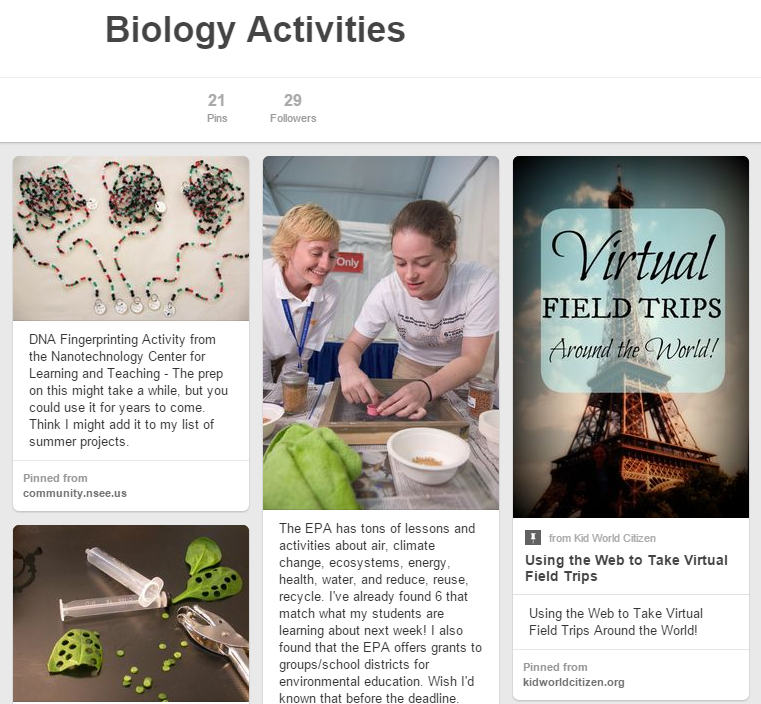
I was surprised to find out how many people use the site for education.  It's easy to learn and there are already collections of active learning techniques created by instructors.  I make my own "boards" (categories) like the one shown above for Biology Activities, and I use them to organize all of the "someday" stuff I stumble across here and there.  Because the pins are visual representations of the ideas, it's easy for me to remember what I liked about the page.  As a bonus, Pinterest sends me suggestions from other boards containing related content.

If you want an introduction to the concept of pinning, click on the video for a quick tutorial.

Yes, Pinterest has the potential to be a time sink, but at the end of my web surfing at least I have a useful product.  Here are some other educational boards I found to give a taste of what the site has to offer:

ESOL for Adults
College Algebra
Inspiration for Students


For more ideas or to learn how to use Pinterest, visit us in the CTE or email Meg Elias at clarkm1@star.lcc.edu.
Thursday, March 26, 2015

Change-Up your Sign-Ups with Google Sheets

How do you instruct your students or your colleagues to sign up for a project or a potluck?
There are many different online tools to collect data, like Volunteer Spot and Sign-up Genius.  The easiest I've found, though, is Google Sheets.

Google Sheets is set up like Excel, and you have free access to it with a Google account.  In the example below, I set up dates and times for class field trips, and asked instructors to fill in their destinations.  The sheet can be shared with and used by anybody, even if they don't have a Google account.


Google has tons of great FREE trainings on the Google for Education site.  LCC instructor Anita Mills completed Google's certification program and is available to discuss more about that process. Anita can be contacted by email at mills87@star.lcc.edu.

For help with Google Sheets or to share your ideas with us, visit the CTE in TLC 324 or email Meg Elias at clarkm1@star.lcc.edu

Tuesday, March 17, 2015

Change-Up Your Lesson Introduction with "Today in History"

How do you start off your time in the classroom?  Those first few minutes can be problematic, with students shuffling papers, taking off coats, finding pens, starting up laptops, checking email and social media.  Some instructors get into the habit of repeating an opening phrase such as "Okay, I'm going to get started now,"  while others jump right into content leaving the slower students behind.

Another option is to ease into the lesson with a piece of relevant news or historical trivia.  Check out the website TODAY IN HISTORY for a daily rundown of political events, science milestones and famous birthdays.  Using August 22 as an example, I found that the Mona Lisa was stolen, Ray Bradbury was born, and Brazil entered World War II.  For lighthearted content, go to THE NATIONAL DAY CALENDAR to find that August 22 is National Tooth Fairy Day and National Pecan Torte Day!  Yes, really.

For more ideas on how to ease into lectures or to share your ideas with us, visit us in the CTE or email Meg Elias at clarkm1@star.lcc.edu.

Thursday, March 5, 2015

Change-up your Communication Using Remind

Especially in online classes, I am always looking for ways to connect with students and open more lines of communication.  I currently make use of an online program called Remind (formerly Remind101) to give students a heads-up about deadlines and even to send encouragement during exam week.

Remind is a free online program or smart phone app that allows students to receive texts from you without revealing any personal information.  You set up an account and a "class," then invite students to join by sending a text to a specific number.  You can then send out messages or schedule them to be sent at a later date or time.

Student reaction has been positive, with about half of my students opting to sign up.  I send just one or two texts per week, and students can drop the service at any time.

For more information, visit us in the CTE or email Meg Elias at clarkm1@star.lcc.edu.

Sign up for a FREE Remind Account

Friday, February 13, 2015

Change-up your Course Intro with Animoto


In an online environment, it can be difficult and time consuming to design content that grabs a student's attention on day one.  Animoto is a web tool that presents educators with an easy-to-use set of templates for creating short videos to use in the online classroom.  They embed easily into Desire2Learn, and educators can apply for a free account to increase their maximum video length from thirty seconds to three minutes.

Here is a video that I created to introduce students to BIOL 120.


On March 18, the CTE is offering a workshop to help you get started using Animoto.  See the CTE Workshop Calendar for more details, or contact Meg Elias at clarkm1@star.lcc.edu

Apply for a FREE Animoto Educator's Account