Showing posts with label Teaching Tip. Show all posts

Tuesday, November 15, 2016

Teaching Tip: The Benefits of Student Journals

by Leslie Johnson 


Deborah Starczewski, a child development instructor at Onondaga Community College, promotes the use of reflective journals in the October 2016 issue of The Teaching Professor. She considers them to be “one of the most valuable and least time-consuming assignments” that her students complete.

Starczewski structures the assignment very simply:

  •  Every other week, she poses a question based on the theories, studies, and classroom activities.
  • Students craft a 2-3 paragraph personal response to the question and submit it via their course management system.
  • She emphasizes that there is no right or wrong answer but that correct grammar and complete sentences are necessary.
  • Journals are private, and the instructor only responds if a student requests feedback.
The most important aspect of Starczewski’s system is that the students don’t lose points if they don’t submit a journal. Instead, 5 points are added to their final grade for each response they submit. In that way, participation is voluntary, but she notes students that still choose to participate and actually tell her how much they enjoyed the assignment. For Starczewski, she not only learns what students are thinking—especially those reluctant to participate in class discussion—she also learns how well they understand and can apply the course material.

Moreover, she explains that while some students are initially resistant to the idea of journaling, many actually enjoy the ability to express their thoughts about what they have learned. “It provides a forum via which students can personally respond without fear of being challenged or ridiculed for their ideas,” Starczewski explains. “If we tell students we are interested in their ideas, thoughts, and viewpoints, then we need to not only listen to those who express them in class but also read the responses of those who write,” Starczewski says. 


If you would like to read more classroom ideas, stop by the CTE during open hours and read the current or past issues of The Teaching Professor.

Reference: Starczewski, D.L. (2016). Encouraging students to think beyond the course material: the benefits of using reflective journals. The Teaching Professor, 30(8), 5.

Wednesday, November 2, 2016

Helping Students Develop Self-Regulated Study Skills

by Leslie Johnson
We know that many students arrive at college with insufficient and ineffective study skills; often they believe that what got them through high school will also get them through college. The October 2016 issue of The Teaching Professor reported how an “authentic” study skills assignment actually helped first-year students improve exam scores.

Students in a first-year experience course were not only taught college-level learning strategies, they were also given an assignment to actually utilize the strategies for an upcoming exam in a course other than the first-year experience. Students created a study game plan that included several parts:

  • Meeting with the instructor about the exam.
  • Using reading review activities.
  • Active note-taking strategies.
  • Implementing their choice of appropriate exam study strategies.
  • Predicting their grade after taking the exam.
  • Reflecting on their preparation and performance after receiving their exam grade.
Study author, H. H. Steiner noted that students need to be provided with such opportunities for “deliberate practice,” actual application of the study skills taught in a way that is meaningful to them. “In order for a person to achieve mastery levels, practice of the skill in an authentic context is necessary,” Steiner writes.

The reflections that the students wrote indicated the effectiveness of an assignment requiring them to use their new study skills. While many were initially reluctant to change their study habits, most students reported an increase in their exam grades. Forty-five percent of the students saw their exam grades improve by one letter grade; another 26 percent saw smaller gains in their grades. The few who reported declines cited “personal circumstances” as interfering with their success. One student even called the project “the most eye opening project of my entire semester.” Importantly, many students noted plans for permanent changes in their exam preparation.

Steiner explained that the project could be easily adapted to any mandatory introductory course students must take or an early course in a major where students need to learn how to study for particular content.

If you would like to read more instructional ideas from the current or past issues of The Teaching Professor, stop by the Center for Teaching Excellence during our open hours. You can even enjoy a cup of coffee or tea while you read!

Reference: Steiner, H.H. (2016). The strategy project: Promoting self-regulated learning through an authentic assignment. International Journal of Teaching and Learning in Higher Education, 28(2), 271-282.

Wednesday, October 12, 2016

Here Comes Generation Z

By Leslie Johnson

Guess who arrived on the LCC campus this fall? Generation Z, that’s who!

Born roughly between 1998 and 2004, these nearly 70 million young people will never know a time when the Internet didn’t exist. The University of Cincinnati worked with a marketing research firm to create a “culture scan” of this generation to help inform college decision making. What they learned can also help us reach these students as they enter Lansing Community College.

According to Autumn Utley, who led the research team, these upcoming students are not only more diverse and globally aware than previous generations, they are also “independent, passionate, and take an active role in their education.” In fact, when surveyed 72% of Gen Z students said they think colleges should allow them to design their own educational program. They also feel strongly that colleges should offer real-world experience beyond coursework and exams.

As teachers then, we should be seeking ways for students to actively participate in the community to help these students apply what they’re learning in our course for their future employment. If you’re looking for some inspiration on how to connect these students to the community, you might want to watch Doug Klein’s 2016 StarTalk on how he involves his students in the world outside of LCC.


We might think that these students are always connected since they have grown up in the age of the Internet and smartphones. And, they are indeed highly connected. On average, most of them use five different electronic devices every day. Approximately 70% of them watch more than two hours of YouTube content per day. (By the way, they rarely watch broadcast television, nor do they really understand what a newspaper is. Instead, they look to social media to receive their breaking news.)

As a result, the UC report noted that Gen Z considers “technology an extension of self—their source of entertainment, education, and most importantly, their way of gathering, sharing and interpreting information.” As educators, we should remember that they have become the “curation generation.” In other words, since they like to collect and share information, they are developing the ‘neuroplasticity’ to “filter and process enormous amounts of information, efficiently and with purpose.” It is going to become our job, as faculty, to help students navigate out of the echo chamber that social media can create and become good digital citizens.

However, Gen Z also has lots of surprises for us. According to the University of Cincinnati research, 85% of them actually prefer face-to-face time with their friends over electronic interaction. The members of Gen Z also read more books than those older 18 and older—and they read mostly print books. So, while they will definitely want many aspects of their learning experience to be “open and connected” like their experiences with the Internet, they also highly value a human connection with their teacher and they understand the importance of printed and hand-written text.

Finally, Gen Z tends to think of themselves as “hacktivists,” someone who disrupts the system in order to facilitate positive change. In other words, they want to solve personal and social problems. Therefore, including a service learning component in a course is also a good way of reaching these students.
If you have suggestions for blog posts or if you would like to discuss Gen Z, email Leslie Johnson (farrisl@star.lcc.edu), or stop by the Center for Teaching Excellence, TLC 324.

Monday, September 26, 2016

Teaching Tip: Using Alternate Text for Images

In higher education, there is an increasing expectation that students are able to access course content online, in the form of PowerPoint presentations, Word documents, and even original material added directly to the Course Management System.  When adding images to digital content, it is important to understand that students who require screen readers may be limited if alternative text (alt text) is not added.  Adding appropriately worded alternative text to an online image greatly improves the accessibility of your course content.   

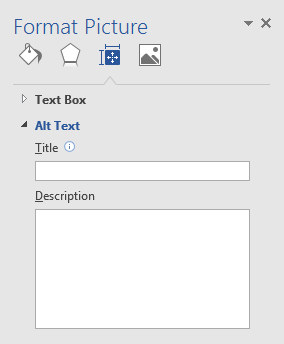
In Microsoft Office products, alt text can be added by clicking on the Format Picture menu.  Type a phrase or short sentence into the description window.

The Format Picture menu in Word has a box for title and a box for description.  

In D2L, when an image is added using the Insert Image icon, you will be prompted to add Alternative Text.  If the image doesn’t add any additional content, you can click, This image is decorative.
 In D2L the user is prompted to provide alternative text.
Your alt text should describe the relevant content that the picture conveys to a sighted person.  As an example, the alternative text for the screenshot on the left might read, “The Format Picture Menu in Microsoft Word has a window to type in a title and a description.”  It is not necessary to use phrases like, “A picture of…” at the start of your text.  


WebAIM has a great article on alt text, that can clarify the purpose and process, and help you decide on the best phrasing to use in different situations.  

Removing barriers to learning is an important concept to embrace in education.  If you would like to discuss more about Universal Design or share your thoughts over a cup of coffee, contact Meg Elias (clarkm1@email.lcc.edu) or visit the CTE in TLC Room 324.  If you have more in-depth questions about accessibility for deaf and/or hard-of-hearing students, or blind/visually impaired students, please contact the Center for Student Access at 517-483-1924.

Tuesday, September 20, 2016

Tips for First Week Online Engagement

by Tim Deines

I’ve been teaching online at LCC for several years now, and I’m finding that there are some simple things I can do at the beginning of each semester to increase the chances, theoretically at least, that students will have a successful term. For you veteran teachers, some of what follows may seem obvious. In any case, it can’t hurt to reflect on how we invite our students into our classrooms in an online context.

Hopefully, it goes without saying that your syllabus should be up and ready to go. We are required to put them on Concourse now, but it might be a good idea to also have it available to students in Word form for easy printing, etc. I also separate out my reading and assignment schedule from the section syllabus so that students have easier access to those tasks and dates.

In addition to nuts-and-bolts tasks like the syllabus, I think it’s really important that teachers personally reach out to students and invite them to participate fully in the class. Online contexts can be intimidating places, too, and it is the teacher’s responsibility to create a hospitable environment for students.

I do this in two ways at the start of the semester. The first is by posting a simple greeting with the ‘News’ function in D2L, but then also pasting that greeting into a class email. This happens the morning of the first day of class.

The second thing I like to do is set up an ‘Introductions’ forum and require students to introduce themselves to the class. I introduce myself first, talk about my interests, etc. My experience is that students will do this. Those that do not, I send out a gentle email to make sure they want to be in the class and understand my expectation that they actively participate in the course. I often hear back from these students assuring me that indeed they are interested in the course and to please not drop them!

It’s important to not assume that students are automatically going to jump into our courses and wholeheartedly embrace them. Some may need a bit of cajoling, kindly reminders, perhaps even a personal email. In my view, this all falls under the job description of good, caring teaching. Education is an invitation to discovery, and we should be always thinking about ways to welcome students through that door.

If you have suggestions for first-week online activities, future blog posts, or if you would like to share anything else, email Tim Deines (deinest@star.lcc.edu), or stop by the Center for Teaching Excellence, TLC 324.

Tuesday, April 26, 2016

Three Tips for Protecting Students' Privacy

by Meg Elias 

When I was taking college biology in 1989, my professor motivated us by posting our exam grades on the classroom door with first and last names attached. We would rush up to the list of 300 and look for our names, ranked from highest score at the top, to lowest at the bottom. It may have been an effective motivator for some students, but it’s not considered an acceptable practice in 2016. When discussing or distributing graded items in the classroom, instructors should be mindful of students’ privacy. These three tips can help you avoid divulging information about an individual’s grades: 

  1. Place written grades on the second page of an assignment or test. As you pass out graded homework or exams, other students should not be able to see an individual’s grade on the front of the document. Placing the grade on the second page allows the student to choose whether or not to show their score to their classmates. 
  2. Have a pen and paper handy to write down a grade when a student asks during class time. Sometimes a student will approach the teaching station and ask you to look up a grade on Desire2Learn. Instead of stating the score verbally, write it down and hand the paper to the student. You can also jot down your office hours so that the student can follow up after class. Never allow the student to look at the gradebook screen if other students’ grades are visible. 
  3. Rehearse a standard reply to student inquiries that might violate another student’s privacy. If a student makes a comparison between their grade and a peer’s grade, you can reply with, “I cannot discuss any other student’s grades with you, but I would be glad to discuss your score during my office hours.” 
Remember that students have the right to share as much or as little as they wish about their scores, whether they are at the top or the bottom of the class. 

If you have more suggestions or if you would like to discuss teaching tips, email Meg Elias (clarkm1@star.lcc.edu), or stop by the Center for Teaching Excellence, TLC 324.

Friday, April 8, 2016

Teaching Tip - Branching Scenarios in PowerPoint

by Meg Elias

I was asked recently about creating branching scenarios for online learning, where students make choices and are guided to different screens based on their answers. One fairly simple option is to build the scenario in PowerPoint, publish it in iSpring (available at the CTE), and then share it with students in D2L. The result is an interactive learning activity that can take the form of a role play or even a multiple choice quiz.

Process Outline
Step 1: Create a map of your scenario on paper. Planning is key, here, to save time later. Below is a sample plan for a simple branching presentation: 


Step 2: Create a PowerPoint containing the text from the scenario. In the example above, I would create: 
  • An introductory or title slide 
  • One slide with the scenario and the three answers 
  • One slide with the “Sorry” message 
  • One slide with the “That is correct” message 
  • One slide with the Perfect Policy Award 
Step 3: Add the “branching.” Right click on one of the “Answer” boxes and select Insert Hyperlink. Under the Link to panel, select Place in this Document, and select the slide that has the result that corresponds to that choice. For example, in the “Answer 1” box, create a link to the “Sorry” slide. 


Step 4: Save the presentation and publish it in iSpring as an HTML5 file, and upload it to D2L. Click the presentation below to see the finished product using the methods outlined above. 


CTE Staff are available to help with this process. Email Meg Elias at clarkm1@star.lcc.edu, or visit our technology room in TLC 324 for assistance.

Tuesday, March 29, 2016

Teaching Tip - Effective Use of Videos

by Leslie Johnson 

I recently participated in a Webinar led by Zac Woolfitt, a lecturer at Inholland University in The Netherlands, who has researched the effectiveness of using video in higher education. Based on his research, Woolfit made some recommendations that made a great deal of sense to me. 

First, he noted that videos should not be very long—10 minutes at the very most. Woolfitt believes that 3-5 or 5-7 minutes, depending on the topic, is optimal. Take much longer topics and break them up into smaller chunks that will keep students’ attention and allow them to easily digest the main point of each video. 

Woolfit especially promoted what he referred to as the “theory of constructive alignment.” Simply put, develop a clear student learning outcome for each video you make and connect some type of assessment to that video. He suggested that the main point of each video should become a question on an exam or quiz. 

However, he also suggested using other types of classroom assessment techniques to reinforce the content. For instance, instructors can have students teach the main point of an assigned video. In a hybrid or “flipped” classroom, break the students into pairs; assign each student a separate video and have them teach the main concept to their partner. In a purely online class, students can be assigned to summarize the video in a discussion forum. 

Woolfit advocated requiring students to ask a follow-up question about each video they watch. Whether it’s done as part of a discussion forum, through email, or during a face-to-face meeting, students can ask for clarification or more information and receive participation points. 

As far as production goes, Woolfit recommends trying to create most videos in just one take. Have a script prepared so that errors can be kept to a minimum. He also advises instructors to keep post-production editing to a minimum. Just like our face-to-face lectures, content (or how we present it) will probably need to be changed on an ongoing basis, so instructors don’t get a great deal of return on crafting perfect videos every time—and students certainly aren’t expecting videos every time. 

Finally, Woolfit recommends a variety of videos. Sometimes, you might want to do a simple screen capture; at others, you may want to record your PowerPoint slides with you speaking over them. For certain lessons, you may want to actually have yourself filmed presenting a lecture to a live audience. 

At LCC, instructors have several resources to help them produce class videos. Kaltura screen capture is available within Desire2Learn. You can create more complex and fully edit screen captures using iSpring and Camtasia, which are available in the CTE’s technology support room (TLC 324). Media Services also has a Podcasting suite, which allows for better quality sound and video capture. In the Teaching Technology Sandbox, faculty can have a lecture recorded as they deliver it to an actual class. 

Please feel free to stop by the CTE during open hours for assistance using Kaltura, iSpring, or Camtasia. If you are interested in using the Podcasting suite or the Teaching Technology Sandbox for Faculty, contact LCC’s Media Services.

Wednesday, March 23, 2016

Teaching Tip: A Guide to Critical Reading

By Guest Blogger, Tammy Root

Are you looking for ways to help your students get more out of assigned readings? Here are five easy reading strategies that can be used in a variety of disciplines. 

1. Turn and Teach: This strategy can be used in two different ways. A). Give students a topic and have them turn and talk about it; this is a great way to activate prior knowledge. B). Have students read an article, or chapter, and have them turn to each other and teach one another what they just learned. How simple is this strategy? 

2. Reading with a Question in Mind: Have students turn the title, and each subtitle, of a chapter into a question (using who, what, when, why, or how). The students will then read the text and answer their questions. This strategy allows students to become “detectives” while reading and stay focused! 

3. Sketching Through the Text: Not every student learns through reading and writing, some students are more visual. This strategy allows those visual students a chance to put words into their own language through pictures! Have students read a section of a chapter or article then have them draw what they just read. This strategy can be used in place of summaries. This is also a great way to review material when studying for a test. 

4. Quote Mingle: Take a copied version of a chapter or article and cut out different quotes. Have the students read the quotes and come up with a title for the chapter or article. After students read the text, see how close their title was to the actual title. This gives students a focus while reading. 

5. Text Coding: Text coding is a short-hand version of text annotating. Below is a link with examples of codes for students to use while taking notes as they read. I also encourage students to make up their own codes. 

http://www.heinemann.com/shared/companionResources/E03087/47_TextCodes.pdf 

If you would like to know more reading strategies I use in my classes, please email me at roott3@lcc.edu; I will send you an example! 

Daniels, Harvey, and Nancy Steineke. Texts and Lessons for Content-area Reading. Portsmouth, NH: Heinemann, 2011. Print.

Monday, March 21, 2016

The World Classroom: Experience of Learning at LCC, Part 1


Last night I caught a vision of what experiential, hands-on education can look like. For three hours, in the Centre for Engage Inclusion, I met with Patty Ayers, Kamar Hamilton, Paul Hernandez, Anne Heutsche, and Kali Mujamdar, and we learned how effective student learning happens through a Service Learning paradigm and application. 

Service Learning is not new, but it remains a unique pedagogy that uses student community involvement and activity to achieve specific learning objectives in a given academic course. While it may appear similar to community service, Service Learning is not simply about helping people and communities in need, important as that may be. Rather, it’s about learning how to integrate and translate traditionally classroom-bound academic study into the broader social, political, and economic environment. 

Ayers, Heutsche, and Mujamdar have been teaching and talking about Service Learning for a while now. With the arrival of Paul Hernandez, LCC’s Chief Diversity Officer, new blood is reinvigorating old efforts. Hernandez has a history of working with at-risk K-12 populations, inspiring them to imagine themselves succeeding in college and university contexts, and teaching them practical skills that can turn higher-education aspirations into reality. 

As I write, Service Learning is gaining precious momentum at LCC and in the broader Lansing area. We are cultivating connections with Eastern, Grand Ledge, and Eaton Rapids High Schools, for example, by training our sociology and history students to work with at-risk students at those schools. Our students develop the skills they need in Service Learning workshops to communicate effectively with Eastern students about the possibilities of their academic careers beyond high school. The high school students, in turn, provide important information that the LCC students can use to further their research activities—ethnographies and local histories, e.g. 

When I expressed some reservations that perhaps my writing and literature courses were not quite right for Service Learning, interested though I was, Hernandez reassured me that “Service Learning is for everybody.” There is not an academic discipline imaginable that can’t be turned in the direction of Service Learning. Neither does such pedagogy need only deal with other educational institutions. When it comes to Service Learning, the world is our oyster, and the only limits lie in the imagination itself. 

In future blogs, we will continue to explore advantages of ‘experiential’, active education, and how it can be used to advance higher education here at LCC and beyond. 

If you would like to discuss Service Learning, contact Tim Deines at deinest@star.lcc.edu or stop by the CTE, TLC Room 324.

Wednesday, March 16, 2016

Teaching Tip - Mid-Semester Feedback


As part of the review of instruction here at Lansing Community College, all sections are given IDEA surveys during the last quarter of the semester. The objective of these student evaluations is to give us information to inform our teaching, but by the time we hear this feedback, the students who gave it are long gone. 

The IDEA surveys are required, but we also have the opportunity to ask our current students what they need while there is still time to implement changes. The mid-point of the semester is a good time to regroup and ask students what’s going well and what needs improvement. 

The Sheridan Center for Teaching and Learning at Brown University has some suggested questions for soliciting input mid-semester: 
  • What aspects of the course have been especially helpful in terms of your learning?
  • What aspects of the course could be improved?
    • What changes could the instructor make to improve the learning environment?
    • What changes could you make to improve your own learning/studying in this course? 
These questions could be answered during a five minute break in lecture or in a D2L survey. After you look over the results, hold a short debrief addressing any student concerns. Concentrate on one or two changes you can make, and try to keep a positive atmosphere. If students have made suggestions that you cannot (or choose not to) implement, I suggest addressing this with the group. Give clear explanations without being defensive … remember that you did ask them for feedback. Students will appreciate being heard, and you may have the chance to close the circle. 

If you need help setting up a D2L survey or would like to discuss mid-semester feedback, contact Meg Elias at clarkm1@star.lcc.edu or stop by the CTE, TLC Room 324.

Wednesday, February 17, 2016

Gamify Your Content with BINGO!

In planning my calendar each semester, I schedule time for in-class exam review.  I find that even a short review session can relieve some of the anxiety students face come test time.  In addition, it's a chance for me to sneak in a low-risk assessment before the "real thing."  Instead of repeating my lecture material, I try to create activities that push the students to be active in their learning.

In cases where students need to master new terminology for an exam, I create custom Bingo cards at Print-Bingo.com.  With 24 terms (plus the FREE center square), Print-Bingo will generate 10 unique cards in a downloadable .pdf file.  For a large class, I either generate multiple sets or just print several copies of one set ... I'm okay with multiple winners.  Students choose a card and they have 5 minutes to look over the terms and ask questions.

When we're ready to play, I read one definition at a time in random order, and the students have to cross-out the corresponding term on their Bingo cards.  When a student gets BINGO, I give them the chance to drop one 2-point question on the exam.  We play until roughly half the class wins.  

For the students who struggle to match definitions to the terms, the game is a wake-up call.  For me, it helps identify students who might need some extra help or even a referral to the Learning Commons.  Yes, there's an element of chance involved in winning (which card you pick), but the risk and the reward are so small that students don't complain.

If you'd like to talk more about using games for test review, visit the CTE or contact Meg Elias at clarkm1@star.lcc.edu.

Thursday, February 11, 2016

Teaching Tip - Video Feedback for Students

For the last few semesters, I have required my Composition II students to complete a public writing project. Since their final work is published on the web, I couldn’t provide them with the type of feedback that I normally do using Microsoft Word: in-text comments throughout their essay and some narrative comments at the end. 

Since I still want to point out specific features within the text as well as provide some summary comments, I use Video Feedback—and I actually receive positive reviews from the students about the videos. The process is relatively quick and easy (once I got the hang of the technology), and it can be used by any instructor who wants to provide some personalized feedback on their students’ work. It doesn’t just have to be a writing assignment; it would work well for any type of digital submission required of students. 

Using Screen Capture, I use the mouse to indicate specific areas within the essay I want to discuss with my students. I simply move my cursor arrow around the general area, or highlight specific parts of the text while I tell the student what I want to say about his/her work. Then, I am able to move my cursor to the next section I wish to discuss. 


To create Video Feedback, you will need a computer equipped with a microphone and a simple Screen Capture program. I used Jing, a program available for FREE download. Now, Kaltura, an easy Screen Capture program, is already available within Desire2Learn (D2L). The advantage of Kaltura is that the video files are easily saved within the “My Media” area within D2L, which makes sharing those videos with students even simpler. As for a microphone, I recommend one of the external headset microphones; they make for much better sound quality. 

 Try these basic steps for giving Video Feedback: 
  1. Read and review student’s work first, taking notes on what you wish to say. Organize your thoughts a bit before you begin recording. 
  2. Call up the student’s work on your computer screen, then open Jing or Kaltura whichever you prefer. Set the screen capture area to record just the student’s work, not your entire computer screen. 
  3. Begin recording, making sure to talk slowly and clearly. Begin with some overall thoughts, especially something positive. Then spend time pointing out interesting ideas or possible areas for improvement. 
  4. If you need to discuss grammar/mechanics errors that overwhelm a student’s writing, do so in a general statement about the problem. Don’t try to point out each and every error; instead, choose one or two examples that are indicative of the patterns you are observing. 
  5. Keep the videos under five minutes. 
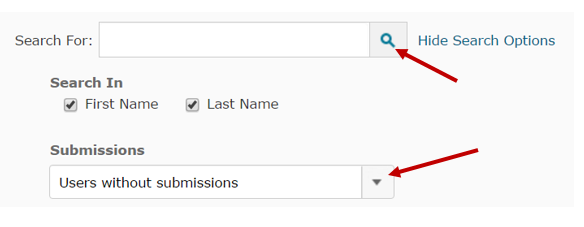
  6. Upload the videos to each student using a D2L dropbox. If the students did not submit the work to a dropbox, create one in D2L anyway. In the Folder Submissions view, select Users without submissions then click on the search icon; you will then be able to see all of the students, enter their grades, and upload the Video Feedback for each one. 

If you would like assistance getting started on providing Video Feedback to your students, email Leslie Johnson at farrisl@star.lcc.edu or stop by the CTE in TLC 324 during our open hours. 

Monday, December 7, 2015

Teaching Tip - Closing the Semester

As instructors, we have been taught that the first day of class is of monumental importance. We’re expected to learn student names, set a positive tone, be confident but approachable, and set clear expectations of our students. With the whole semester in front of us, it’s easy to be optimistic and upbeat on day one. 

Day eighty is a whole different story, isn’t it? When you and the students are tired and filled with stress, it’s tempting to end the semester with a whimper instead of a bang. But when students walk out on the last day, they’ll take a final impression with them, maybe just as strong and important as the first. By the sixteenth week, you’ve spent many hours together and formed a community. Take a minute to say goodbye in a meaningful way. 

Before handing out that last exam, you might recap the high points of the semester, or give a summary of what you’ve learned while teaching the class. Maybe read a quote that evokes a certain emotion about the content, or something inspirational that will help them get through a week of difficult exams and final projects. 

During my final class, when my students hand in their tests, I say goodbye to each of them by name and say something personal about our shared experience. In that gesture, I set aside grades and missed due dates, and acknowledge that the semester was meaningful to me. I try to take those last moments to end the semester thoughtfully and with purpose. 

For more ideas about ending the semester on a high note, see the Teaching Tip, “Bringing Closure” on the CTE website. 

Monday, November 30, 2015

Inside the Teaching Professor - Learning Logs

by guest blogger Tim Deines

Regardless of discipline, faculty are increasingly interested in getting students to write. In a recent issue of The Teaching Professor, “Learning Logs” reminds us that teachers understand the intellectual value in ‘writing across the curriculum’. 

But even when educators support writing in their discipline, they might not know what to assign. What does writing look like, for example, in an intermediate calculus class? That’s where the practice of learning logs comes in. 

A learning log is one of any number of flexible writing assignments that enables students to approach their academic discipline from a ‘writerly’ point-of-view. Learning logs can change depending on what the learning objective of the assignment is. For example, perhaps a physics teacher thinks that if students explore their emotional responses to the latest chapter in quantum theory they will digest the ideas better. An appropriate learning log could then ask students to free-write about how they feel as they work through this particular part of the course content. This could be a low-stakes writing assignment with little or no grade attached to it. 

October's The Teaching Professor has many more examples of learning log activities that teachers can use in their classrooms.  Visit the Center for Teaching Excellence (CTE) to check out a copy! 

Reference: “Learning Logs” (2015) The Teaching Professor, 29.8 (October), 6.

Tuesday, November 17, 2015

Lilly Series - Pulling the Rug Out

By CTE staff member and biology instructor, Meg Elias.  The Lilly Series is a set of posts based on sessions held at the Lilly Conference for Evidence-Based Teaching, October 2015.
 
To teach independent thinking in the college classroom, it is important to give students opportunities to take risks without the penalty of “being wrong.” In my experience teaching science to non-majors, students often hesitate to voice their opinion on any subject, perhaps because they aren’t sure how they would defend themselves if challenged. Jeff Murray’s Pulling the Rug Out session at the Lilly Conference gave me an idea for a learning activity based on an ethical question which would allow students to reflect on and challenge their own beliefs in a safe environment.

In one of the varied activities during Murray’s workshop, we were given a list of 16 living things ranging from broccoli to dolphins. We were instructed to assign each item to a category.  Here are my answers:

Acceptable to kill for want
Acceptable to kill for need
Never acceptable to kill
Broccoli
Rose
Chicken        Cow
Turtle          Salmon
Butterfly      Rat
Mussel          Mosquito
Snake
Dog
Monkey
Cat
Horse
Dolphin

I found it to be a very simple exercise, until Jeff asked us to define the rules we used to separate the organisms. Even though I am a biologist, it was hard for me to verbalize why I had listed a chicken as acceptable to kill for need, but not a dolphin (brain size, maybe). In comparing notes with my neighbors, I was surprised to find out that one of them disagreed with my decision that it was okay to kill a rose bush “for want.”  That conversation forced me to put into words the difference I see between harming a plant versus harming an animal (the presence of a nervous system).  How then, do I justify swatting a mosquito that might bite me?  Is that really a need?

The discomfort at having to defend an ambiguous opinion is part of the “pulling the rug out” that Murray wanted us to experience. I can foresee using a similar activity within a genetics unit, asking students the acceptability of various ethical scenarios involving genetic manipulation in plants and animals. Is it acceptable, for example, to give prospective parents the right to select embryos that are healthy and free from genetic diseases? Is that different from artificially selecting the gender of their offspring? 

We need to teach our students that there is value in digging deep and revisiting our perceptions of the world, even allowing them to change their minds in the process.  Activities that challenge us to remove subjectivity can expand scientific literacy and build a sense of ethical responsibility, objectives that should be considered as important as retention of content.

Read more of Jeff Murray’s work here:


If you'd like to learn more about the Lilly Conference, visit the CTE or contact Meg Elias at clarkm1@star.lcc.edu.

Tuesday, November 10, 2015

Inside the Teaching Professor - Collaborative Testing

by guest blogger Tim Deines

A recent article in The Teaching Professor suggests that collaborative learning can be an effective pedagogical strategy. Drawing on the work of Giuliodori, et al, the article, “Getting to the Right Answer in Collaborative Testing,” affirms that collaborative learning has always been at the heart of scientific advancement. “Why then,” ask researchers, “do we discourage collaboration by telling our students to ‘keep your eyes on your own paper’” (qtd. in “Getting to the Right Answer” 2)?

Still, faculty worry about how collaborative testing and learning affect student testing performance. What is the relative impact of well-performing and poorly-performing students on the collaborating group, for example? Faculty may ask, “Are the smart students making the decision for the rest of the group” (“Getting to the Right Answer” 2)?

Giuliodori’s research, which sampled the individual and group testing behavior of 65 vet students, found that having the right answer was more important than being a “high-performing” student. Students of all performance levels were usually able to convince fellow students through discussion that their answers were the correct ones.

This data challenges the assumption that we learn best on our own. Giuliodori’s findings suggest that there may be a need for a pedagogical paradigm shift in how we teach and test.

Stop by the Center for Teaching Excellence (CTE) to read the entire article!

Reference: “Getting to the Right Answer in Collaborative Testing” (2015) The Teaching Professor, 29.8 (October), 2-5.

Wednesday, November 4, 2015

Lilly Series - Empathetic Teaching to Meet Student Needs

By guest blogger and Early LCC Laboratory Instructor, Heidi Jordan.  The Lilly Series is a set of posts based on sessions held at the Lilly Conference for Evidence-Based Teaching, October 2015. 

Rowell used this picture as a visual representation of empathy.
It can be easy to fall into the trap of frustration with the learner when students are not understanding course content or keeping up with the course load. At the Lilly conference, I attended a keynote presentation by Katherine Rowell on The Importance of Teacher Empathy in Student Success. It was an appreciated reminder of how I can use empathy to better meet the needs of our traditional and non-traditional students, helping them to succeed at Lansing Community College. 

We often think of having to water down the curriculum in order to show empathy for our students, however there are ways to do so without expecting your students to do or learn less. Getting to know your students is the first step. What are their personal and academic goals? What are their fears? You can better prepare yourself to meet their needs when you know what those needs are. Building rapport with students can be an important part of helping them feel comfortable in a college classroom setting. You might inject appropriate humor into your lectures to do this, or you might consider adapting a more authentic approach and teaching style. 

Building positive relationships with students can take time but there are practical and simple things that can be done immediately to show empathy and understanding of your student’s needs. Your syllabus could be “warmed,” reviewing the language and adapting it with terms that are easily understood by your students. Emailing or calling students when they miss class can be a personal way to connect with them to let them know it was noticed. Some instructors might even consider encouraging activities outside of the classroom, i.e., peer lunches or study groups in the park. 

Reviewing your tardy and attendance policies, or offering a limited amount of test retakes might be another idea. Many colleges and universities are moving to policies that scaffold their expectations based on the course level and student population. Our work as educators is becoming increasingly complex as our students have increasingly varied needs. Using empathy with our students may be the key to their success. 

If you'd like to learn more about the Lilly Conference, visit the CTE or contact Heidi Jordan at jordanh@star.lcc.edu.

Tuesday, October 27, 2015

Lilly Series - Gone Fishing: How Bass Fishing Can Enhance Your Classroom Teaching

By guest blogger and LCC math professor, Cathy Griffin.  The Lilly Series is a set of posts based on sessions held at the Lilly Conference for Evidence-Based Teaching, October 2015.

Lilly Conference Session facilitated by Jay Rozema- Missouri Valley College

At the Lilly Conference in Traverse City, Professor Rozema said, “Fishing for bass is similar to teaching college.” He then showed video clips of fishermen sharing the importance of maintaining a positive attitude and “to not let past fishing success dictate the bait we use or where we fish.” So, don’t let past teaching success dictate the teaching ‘tools’ we use or the ‘way’ in which we teach. The same techniques don’t always work; we must adapt and always keep a positive attitude. 

A fisherman with a rod and reel, and a large bass
Catching bass is similar to teaching students in that we need to ‘hook’ them. We need to keep putting different ‘baits’ out in front of them to ‘lure’ them into learning and make them want to ‘bite into’ the content. He said that if one ‘lure’ doesn’t work, we need to maintain a positive attitude and try different techniques (eg. different color, texture, and kind of bait). 

Bass follow a pattern that is similar to the patterns of student learning. 

Spring (semester start): Bass want to spawn; they are easy to find and easy to catch. At semester start, students are excited and eager to learn since they are motivated to do well. 

Post Spawn/Summer (midterm): Bass are said to be ‘lock-jaw’. They want to feel safe, so they head to deeper water where they can ‘breathe easy’ as there is more oxygen there. Bass are lethargic and not interested in most bait. They are difficult to catch! Students get ‘lock-brain’ about mid-semester during mid-terms. They are easily distracted (Facebook, Snap Chat, parties, football games) and are looking for comfort and safety, often missing the objectives that we are ‘casting’ their way. 

Fall (end of semester): Bass head to shallow water once again chasing shad. They are gorging on food and are very active as they bulk up for winter. Students at semester end are eager once again; they are ‘gorging’ on material as they prepare for the Final Exam and are frantic about the end-of-the-semester. Often you will hear them asking for ‘more’… (extra credit). 

As a result of this, we should put our most important concepts in the beginning of the semester and at the end, considering that is when we will most likely ‘catch’ those bass (students)! 

If you'd like to learn more about the Lilly Conference, visit the CTE or contact Catherine Griffin at griffic@lcc.edu.